Sublimation Time, Temperature & Pressure Master Guide
Quick-Reference Table
The full data from this cheat sheet, right on the page.
| Blank Substrate | Heat Press Temp (°F) | Dwell Time (Seconds) | Pressure Level | Peel Temperature |
|---|---|---|---|---|
| 100% Polyester T-Shirt | 385°F–400°F | 45–60 secs | Medium (40 psi) | Warm Peel |
| 20oz Skinny Tumbler (Press) | 385°F | 50 secs + rotate 50 secs | Firm Pressure | Cool completely |
| Ceramic Mug (Mug Press) | 380°F–400°F | 180–240 secs | Medium-Firm | Cool in warm water bath |
| Hardboard Coasters | 400°F | 60 secs | Medium | Hot Peel |
| FRP Plastic Keychains | 385°F | 60–75 secs | Medium-Light | Cool under heavy book |
| Photo Slate Plaque | 400°F | 300–360 secs (Face down) | Medium-Firm | Let cool completely |
How to Use This Chart
Pin this chart where you work: it packs 6 entries and 5 columns (Blank Substrate, Heat Press Temp (°F), Dwell Time (Seconds), Pressure Level, Peel Temperature) into one printable page, built for quick lookups.
Scan down the Blank Substrate column to your item, then read across for Heat Press Temp (°F), Dwell Time (Seconds).
Example: for 100% Polyester T-Shirt, the chart gives Heat Press Temp (°F) of 385°F–400°F.
- Compare values down a single column to spot the pattern before you commit to a choice.
- When two rows look close, the Peel Temperature column usually breaks the tie.
- Print it once and keep it where you work — that's the whole point of a cheat sheet.
Printable Sheet Preview
High-Contrast Layout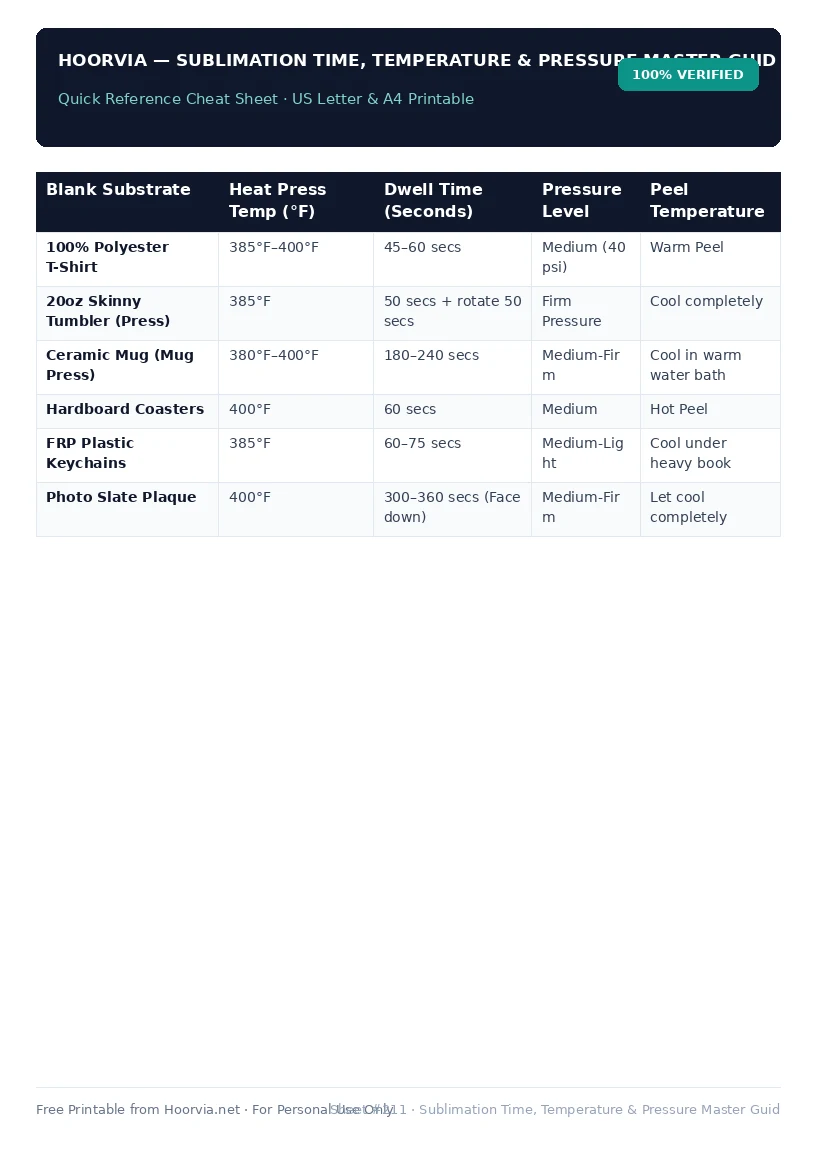
Download Your Free Printable Sheet
Download the printable PDF below. It is the same sheet shown in the preview above, ready to print on US Letter or A4 — open it and choose Print, with Scale set to Fit to Page.
💡 Pro Printing Tip: In your printer settings, set Scale to “Fit to Printable Area” and enable “Background Graphics” for color headers.