Sublimation Time & Temp Cheat Sheet
Sublimation time and temperature for mugs, tumblers, T-shirts, coasters, phone cases and more — Fahrenheit and Celsius.
Sublimation only works when the blank is polyester-coated (or polyester fabric) and the heat and time are right. Too cool and colours look faded; too hot or too long and they blur or scorch. This chart gives starting settings for the blanks sellers use most, so your first press is close, not a guess.
Quick-Reference Table
The full data from this cheat sheet, right on the page.
| Blank | Temp F / C | Time | Pressure / Notes |
|---|---|---|---|
| Ceramic mug (11 oz, mug press) | 400°F / 204°C | 180 sec | Medium; tape design tightly, no gaps |
| Ceramic mug (flat press, wrap) | 400°F / 204°C | 240 sec | Medium; rotate halfway if press is uneven |
| Stainless tumbler (20 oz) | 385°F / 196°C | 120 sec (rotate) | Medium; use tumbler press or oven wrap |
| Polyester T-shirt (white/light) | 385°F / 196°C | 50–60 sec | Light-medium; lint-roll first |
| Polyester tote / pillowcase | 385°F / 196°C | 50–60 sec | Light-medium |
| Ceramic coaster | 400°F / 204°C | 240 sec | Medium; print face down on blank |
| Slate coaster | 380°F / 193°C | 360 sec | Medium; handle hot slate with gloves |
| Aluminium photo panel | 400°F / 204°C | 90 sec | Medium; peel hot with gloves |
| Phone case (sublimation blank) | 365°F / 185°C | 60 sec | Light; use case jig for alignment |
| Mouse pad | 385°F / 196°C | 60 sec | Light-medium |
| Keychain (MDF / acrylic blank) | 385°F / 196°C | 60 sec | Light; tape all edges |
| Glass cutting board | 400°F / 204°C | 300 sec | Medium; glass stays hot — gloves essential |
Printable Sheet Preview
High-Contrast Layout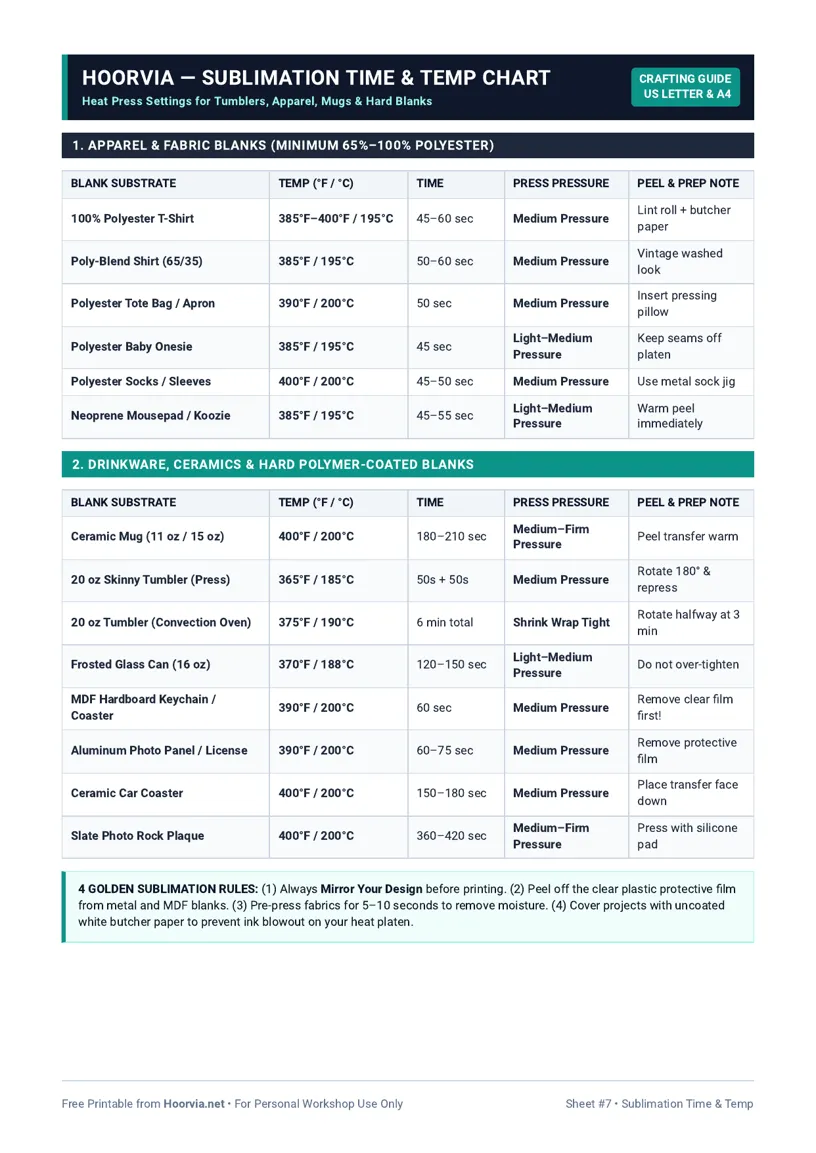
Download Your Free Printable Sheet
Download the printable PDF below. It is the same sheet shown in the preview above, ready to print on US Letter or A4 — open it and choose Print, with Scale set to Fit to Page.
💡 Pro Printing Tip: In your printer settings, set Scale to “Fit to Printable Area” and enable “Background Graphics” for color headers.
How to Print & Use This Chart
Print this sheet on US Letter or A4 and keep it at your press station, not across the room — sublimation timing is short and you will want the numbers in sight while you work. Use “Save as PDF” in the print dialog for a PDF copy, choosing Letter or A4 for your paper. Laminate it, because sublimation areas get hot and inky, and a laminated sheet can be wiped clean and will not curl from heat the way plain paper does. If you sell blanks, a second copy near your packing area helps you answer customer questions without hunting through supplier PDFs.
The details matter as much as temperature: mirror your image before printing, use sublimation paper and ink (regular inkjet ink will not transfer), tape the design tightly with heat tape so it cannot shift and ghost, and lint-roll fabric blanks first. Preheat fabric for 5 seconds to remove moisture, then press without moving the press — shifting mid-press causes a double image. After pressing, peel carefully with heat-resistant gloves; colours look dull until they cool and fully develop. If colours are faded, the usual culprits are too little time, a non-polyester blank, or a print that was not mirrored. Keep a test blank of each type and record the exact setting that worked on this sheet, because two suppliers’ “same” mugs can need different times.
Frequently Asked Questions (FAQs)
Why are my sublimation colours faded?▼
Usually the blank is not polyester/coated, time was too short, or temperature was too low. Test on a known sublimation blank before blaming the printer.
Do I need to mirror the image?▼
Yes, always mirror (flip horizontally) before printing, or text will read backwards after transfer.
Can I sublimate on cotton?▼
No — sublimation ink bonds to polyester. On cotton it washes out and looks faded. Use at least 65% polyester, ideally 100% for bright results.
What causes ghosting / double images?▼
The paper shifted during or after pressing. Tape all edges firmly and do not lift the press and re-press in a different position.